Most business owners think SEO is all about keywords, backlinks, and content.
You pick a few keywords, write a few blog posts, maybe get a few links and you wait for traffic to grow.
But here’s the truth: even if your content is genuinely good, if your website has hidden technical problems, Google won’t rank it the way it could.
I see this all the time when I run SEO audits for clients (and I’ve done over 300!): the business has a strong offer, clear services, and a credible brand, yet something small “under the hood” quietly blocks Google from crawling, indexing, or understanding the site properly.
Let’s Make Your SEO & Content Work Better for Your Business
In this guide, I’m going to show you how to audit a website for SEO step by step and provide you with an SEO audit checklist, the same structured process professional agencies use when delivering high-level audits. You’ll learn how to find what’s hurting rankings, what to fix first, and how to turn your audit into a clear growth plan instead of a confusing list of issues.
Think of a complete SEO audit as a health check for your website. We’re not guessing. We’re diagnosing.
By the end, you should be able to look at your site and understand it the way Google sees it and that’s the real advantage of doing a complete SEO audit properly.

Diagnosis Before Treatment
Let’s say you wake up one morning and your car won’t start.
You probably wouldn’t start replacing random parts. You wouldn’t change the tires, then the radio, then the steering wheel, hoping the engine comes back to life. You’d check the battery. You’d check fuel. You might run a diagnostic scan or call a mechanic who can identify the real cause.
And yet, most businesses do the opposite with SEO.
When rankings drop, they publish more content, chase new keywords, tweak headlines, or even buy backlinks without confirming why traffic dropped in the first place. That’s the SEO version of treating symptoms without running tests.
An SEO audit is your diagnostic scan. It tells you what’s healthy, what’s weak, and what’s silently hurting performance. When you understand that, every improvement you make becomes intentional, prioritized, and measurable, not a random effort.
So we’ll go layer by layer, from the structure of your site to its credibility, and by the end, you’ll know how to turn a website from invisible to visible using a complete SEO audit framework.
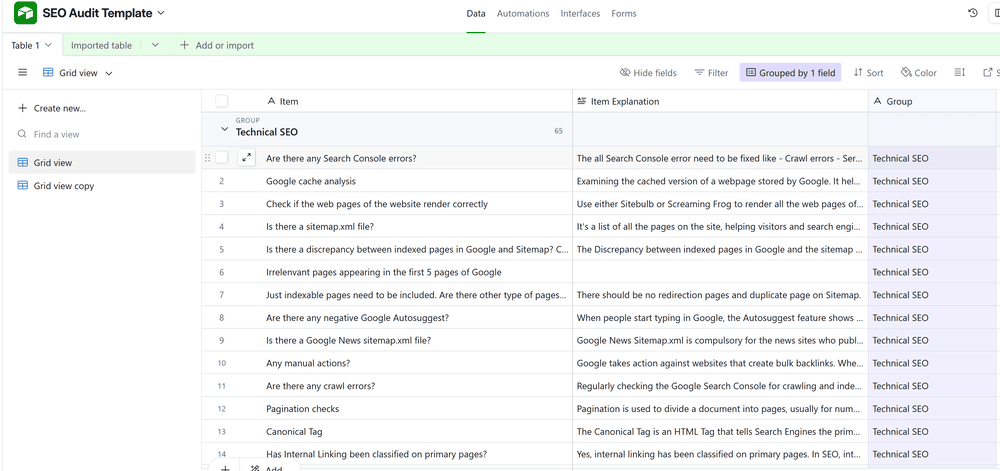
Let’s start the diagnosis. Here is the complete SEO audit checklist:
1) Technical & Mobile SEO Audit – Checking the site’s vital signs
If your website is the body of your business, technical SEO is its heartbeat. This is the layer where you confirm whether Google can crawl your pages efficiently, load them fast enough, and understand the structure well enough to trust what it finds.
A lot of websites fail here without realizing it, because technical issues don’t always “look” like issues. Pages load. The design looks fine. Leads still come in sometimes. But rankings stagnate because Google encounters friction: blocked crawling, messy redirects, thin internal pathways, slow templates, or inconsistent directives.
Step 1: Crawlability and indexing
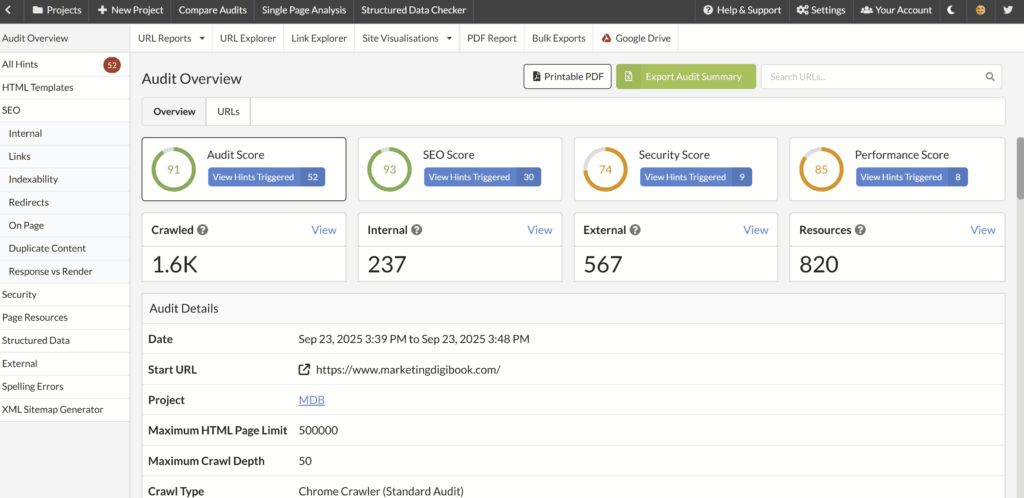
Start by crawling your website using a tool that emulates a search engine crawl, such as Screaming Frog or Sitebulb. Think of this as Google’s stethoscope: it scans the site the way a search engine does and shows what’s reachable, what’s broken, and what’s structurally confusing.
When you crawl, you’re looking for issues that prevent Google from discovering and processing your pages properly, including:
- Blocked URLs (for example, pages you want indexed that are accidentally noindex or disallowed).
- Redirect loops (URL A redirects to URL B, which redirects back to URL A).
- Long redirect chains (URL A → B → C → D) that waste crawl budget and dilute signals.
- Orphan pages (pages that exist but have no internal links pointing to them).
- Unexpected canonical tags that point to the wrong version of a page.
A useful way to picture this is the “delivery driver” metaphor: consider Google a delivery driver trying to deliver your content to search results. If your internal roads are broken, if signs are missing, or if the map is contradictory, Google can’t reliably deliver your content.
This step often reveals the difference between a site that “has content” and a site that is actually crawlable at scale.
Step 2: Sitemaps and robots.txt
Next, confirm your sitemap and robots.txt rules are aligned.
Your XML sitemap tells Google where everything is. Your robots.txt file tells Google where not to go. If either is missing, outdated, or misconfigured, it can silently block entire sections of your website.
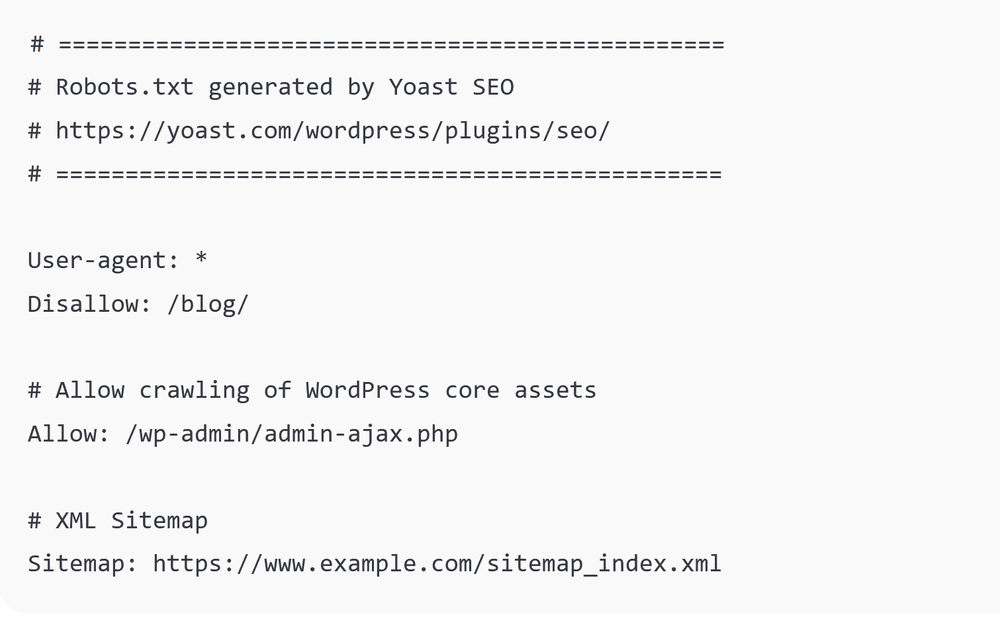
A surprisingly common issue is a site accidentally blocking its most important pages. For example, I’ve seen businesses block their /services/ section or their /blog/ folder and then wonder why nothing ranks, because the site still “works” for users, but Google receives instructions not to crawl.
You want a situation where your sitemap contains your indexable pages (not everything, only what should rank), and robots.txt does not block those areas. You also want to confirm that the sitemap is actually accessible, correctly formatted, and submitted in Search Console.
SEO Audit Checklist – Step 3: Broken links and 404s
Now scan for broken links and 404 errors.
Broken links do two things at once: they create a poor user experience (visitors hit dead ends), and they waste crawl resources (Google follows links that lead nowhere). Over time, this creates a site that feels less “maintained,” which can weaken overall trust and crawl efficiency.
When you find 404s, handle them strategically:
If the page should exist, restore it or fix the link. If it was moved, use a clean 301 redirect to the best relevant replacement. If it should not exist anymore, make sure you remove internal links pointing to it, so you stop sending both users and Google into a closed door.
Step 4: Page speed and Core Web Vitals
Speed is not just about “SEO points.” It’s about user experience, and user experience affects performance. A site that loads quickly holds attention. A site that takes too long loses visitors before they even see the value.
Use Google PageSpeed Insights or Lighthouse to test key templates especially:
- Your homepage.
- Your main service pages.
- Your blog template (because blog traffic is often the primary acquisition channel).
As a general benchmark, aim for a performance score above 80 on mobile and desktop, understanding that different sites have different constraints, but the principle is stable: faster is almost always better.
If your scores are low, the most common fixes are usually not mysterious:
You compress and resize images properly. You reduce heavy scripts and third-party trackers where possible. You enable caching correctly. You minimize render-blocking resources. In some cases, you invest in better hosting because infrastructure is the bottleneck.
Speed is often the “vital sign” that tells you whether your SEO efforts will compound or leak.

Step 5: Mobile SEO audit
Google indexes mobile first, which means your mobile site is the site Google evaluates as primary. That fact alone makes mobile usability non-negotiable, even if your audience is mostly desktop, because the crawler and indexation systems rely heavily on the mobile version.
Check your site on your phone like a real user:
Is the text easy to read without zooming? Are buttons comfortably clickable? Do forms work smoothly? Does the page load in under three seconds on a typical mobile connection?
If the answer is no, you start here, because mobile usability affects rankings and conversions at the same time.
A slow, unresponsive website is like a patient struggling to breathe — no other treatment will matter until that’s fixed.
Content & On-Page SEO Audit – Examining the brain
Let’s Make Your SEO & Content Work Better for Your Business
Once the structure is healthy, you audit the “brain”: your content, your on-page signals, and the clarity of topical relevance.
This is where Google decides whether you’re an expert, a generalist, or simply not the best result.
The content audit is not just “is it written well.” It’s whether the site communicates expertise consistently, whether pages match search intent, and whether Google can understand how your pieces connect into a coherent topical map.
Step 1: Check for thin or outdated content
Start in Google Search Console and identify pages that get zero impressions or almost no clicks. These are not always “bad” pages, but they often indicate that the page is either targeting the wrong intent, lacks depth, or is not supported internally.
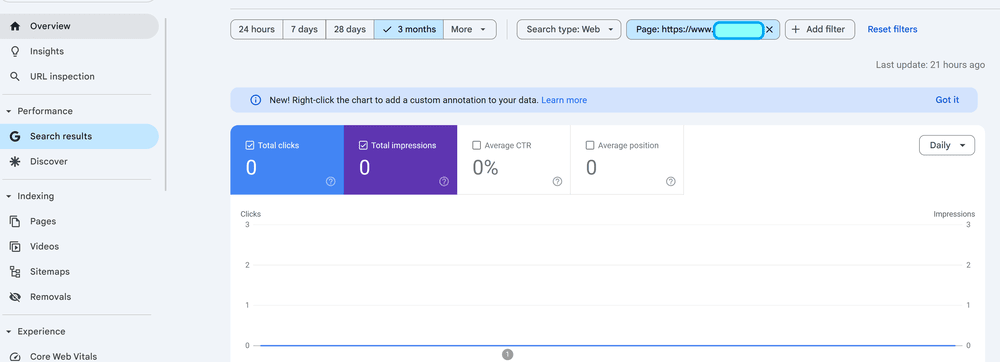
A common example is a services page that is too short. If your “Services” page has a few sentences and a contact form, it may not be enough in competitive spaces. Strengthen it with benefits, FAQs, process steps, pricing context (even if you don’t publish exact prices), testimonials, or examples that reduce buyer hesitation and increase relevance.
Another example is a blog post that was accurate two years ago but lacks updated context, updated screenshots, or new angles that competitors now include. Content decay is real: pages don’t always “fall” because they became worse; they fall because competitors became better, and search intent became more demanding.
Step 2: Detect duplicates and keyword cannibalization
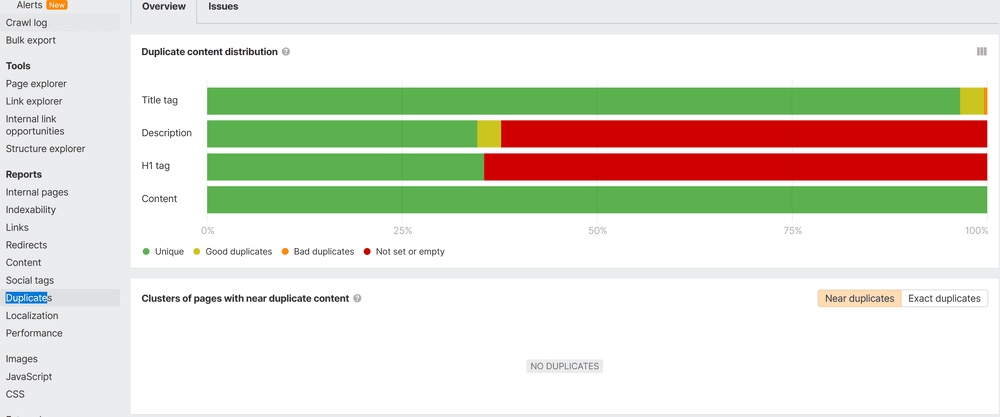
Use Semrush or Ahrefs to find pages competing for the same topic. Keyword cannibalization happens when multiple URLs target the same or very similar intent, so Google has to choose which one deserves ranking — and sometimes it chooses none strongly.
The script example is perfect: if you have three blog posts about “How to Choose a Divorce Lawyer,” Google may not know which one is the best answer. The solution is usually consolidation: merge them into one comprehensive guide, redirect old URLs where needed, and make the merged page clearly superior.
Cannibalization is not “more content equals more rankings.” Often, fewer pages with stronger depth equals more stability.
Step 3: Internal linking structure
Internal links are how Google discovers what matters and how topics relate. Imagine Google as a reader following clues. If a page isn’t linked from anywhere, it’s effectively invisible.
In a healthy architecture, every important page is reachable in three clicks or less, and supporting blog content links to core service pages in context (not spammy, not forced – naturally, when it makes sense).
Internal linking does two strategic jobs:
It distributes authority from high-performing pages to pages that need help. And it tells Google what the site is “about” by reinforcing topical relationships.
Step 4: Topical clusters
Topical clusters are the structure that turns a blog into an authority hub.
A cluster starts with a broad pillar topic and branches into supporting subtopics. The law firm example captures this well:
If your main topic is “Family Law,” supporting pages could cover “Divorce,” “Child Custody,” “Child Adoption,” “Prenuptial Agreements,” and more and those pages should link to each other strategically.
This structure helps Google understand you’re not publishing random articles; you are building expertise in a defined area.
Content SEO Audit Checklist – Step 5: On-page optimization
Now review your page titles, H1 headings, and meta descriptions.
This is where many sites leave easy wins on the table. A title like “Services | Johnson Law Firm” tells Google almost nothing about what you offer and tells users almost nothing about why they should click.
Compare that to: “Family Law & Divorce Services | Johnson Law Firm – Expert Legal Help You Can Trust.” This includes the topic, aligns with intent, and communicates value.
Your goal is not to stuff keywords. Your goal is clarity: “What is this page about, and why is it the best result?”
Step 6: NLP and semantic relevance
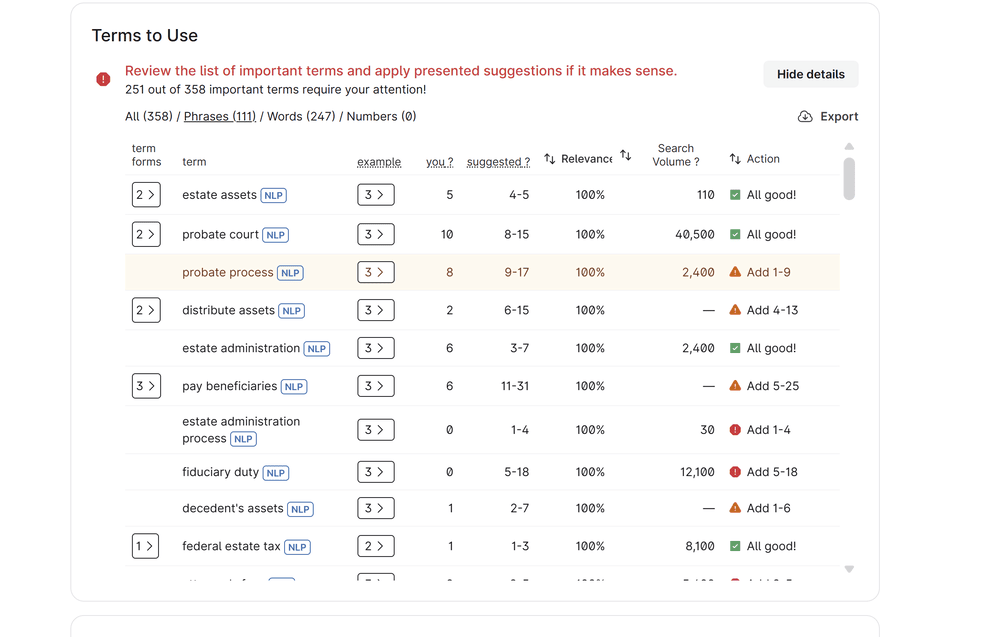
Modern search systems evaluate semantic completeness. Tools like SurferSEO, Neuronwriter, or Clearscope help you identify whether your content covers the terms, entities, and related concepts that the topic expects.
The script makes the point clearly: if your article about “SEO audits” never mentions “indexing,” “backlinks,” or “page speed,” it’s incomplete in Google’s eyes.
This does not mean you add keywords randomly. It means you cover the real subtopics a user expects when they search — so the page feels complete, trustworthy, and useful.
Your content is like your brain’s communication: if it’s fuzzy, inconsistent, or repetitive, Google can’t understand what you’re trying to say.
3) International SEO Audit — Speaking the right language
If your business serves multiple regions or languages, international SEO becomes a separate layer of risk and opportunity.
International SEO is not simply translation. It is making sure search engines serve the correct version to the correct audience and that each version is strong enough to rank in its own market.
Hreflang tags
Hreflang tells Google which language and country version of your content to show. Without hreflang, Google may guess incorrectly.
That can create problems like users in Germany seeing the English page, or users in the UK seeing a page meant for the US. Even worse, it can cause the wrong version to rank, which weakens conversions because the content doesn’t match language expectations.
Localized URLs
Use clean structures like country-specific subfolders: for example “/de/” for German and “/fr/” for French.
Avoid auto-translations because they confuse users and Google. Machine translation can be a starting point for internal drafts, but publishing unedited auto-translations as your international strategy often harms credibility and performance.
Consistent metadata
Translate titles and meta descriptions properly, not word-for-word. Keywords differ across languages in how people search.
The example matters: “Wedding Rings” in English might be searched as “Trauringe” in German. That is not a translation choice; it is a search behavior reality.
Interlink language versions
International sites should always make it easy for users and search engines to switch between language versions. Make sure each page points to its equivalents.
If hreflang tags are wrong, it’s like sending the right medicine to the wrong patient — your message lands in the wrong country.
4) Local SEO Audit — Your neighborhood check-up
For local businesses, SEO success starts where people live and search. Queries like “dentist near me” or “plumber in Berlin” rely heavily on local signals and trust indicators.
Local SEO is not just about ranking; it is about being the obvious, credible option in a geographic market.
Step 1: Google Business Profile
Claim and optimize your listing. Add real photos, correct categories, working hours, and posts. Keep the description consistent and specific.
A Google Business Profile is often the first thing a local prospect sees. If it’s incomplete, inconsistent, or outdated, it weakens both rankings and conversion confidence.
Step 2: NAP consistency
Your business name, address, and phone number should be identical across directories — Yelp, Bing, Apple Maps, industry directories, and local listings.
Even small variations, like “St.” versus “Street,” can cause confusion at scale. You’re not just trying to “appear.” You’re trying to appear consistently.
Step 3: Local schema markup
Add LocalBusiness structured data so Google can interpret your location, contact info, and reviews more reliably.
Schema won’t magically fix weak content, but it reduces ambiguity and improves how your information is processed.
Step 4: Location-specific pages
If you serve multiple cities, create unique pages for each one. Avoid copy-paste city pages with swapped names. Instead, include city-specific testimonials, local context, and relevant imagery.
Local pages should feel real and tailored, because local intent is high-intent and sensitive to trust.
Step 5: Reviews and reputation
Encourage real reviews on Google and respond to them. A steady flow of positive reviews is one of the strongest local ranking factors and it also influences whether a prospect chooses you.
Your local SEO is your reputation in the neighborhood; if your address or reviews are inconsistent, customers simply go next door.
5) EEAT Audit — Building trust and professional credibility
Once you’ve built structure and visibility, you need trust.
EEAT (Experience, Expertise, Authoritativeness, and Trustworthiness) is how Google decides whether to believe you — especially in sensitive niches, competitive markets, and topics where accuracy matters.
This is not abstract. EEAT shows up in tangible site elements.
Step 1: Author transparency
Every major article should have a visible author bio, ideally with credentials or a link to a real profile (for example, LinkedIn).
Anonymous content is not “wrong,” but it is often less competitive, because it lacks the signals that show accountability and experience.
Step 2: Company information
Have a complete About page, Contact page, and visible legal policies (privacy policy, terms where relevant). Google uses these signals to verify legitimacy and reduce risk.
Trust is not built only through words. It is built through presence and transparency.
Step 3: Expert mentions
If your business has been featured in industry sites, associations, podcasts, conferences, or reputable directories, showcase it. Add “as seen in” references where accurate. Mentions from credible sources reinforce authority.
Step 4: Testimonials and reviews
Showcase real feedback and results, because it reduces buyer uncertainty and provides credibility signals.
The script example illustrates how a testimonial can communicate value quickly:
“After working with Lorraine, our traffic grew 280% in six months and we finally started getting consistent leads.”
Testimonials are not just conversion tools. They are trust assets.
Step 5: Security and privacy
Use HTTPS, display trust indicators appropriately, and keep privacy policies up to date. If you collect data through forms, make compliance visible.
EEAT is like your professional license — it tells both Google and your audience that you’re qualified, reliable, and real.
6) Backlink & Negative SEO Audit — The reputation test
Even if everything on your site is perfect, toxic backlinks can pull your rankings down.
Think of backlinks as external endorsements. High-quality links from relevant sources strengthen authority. Spammy links from irrelevant or harmful sites create risk.
Step 1: Backlink quality
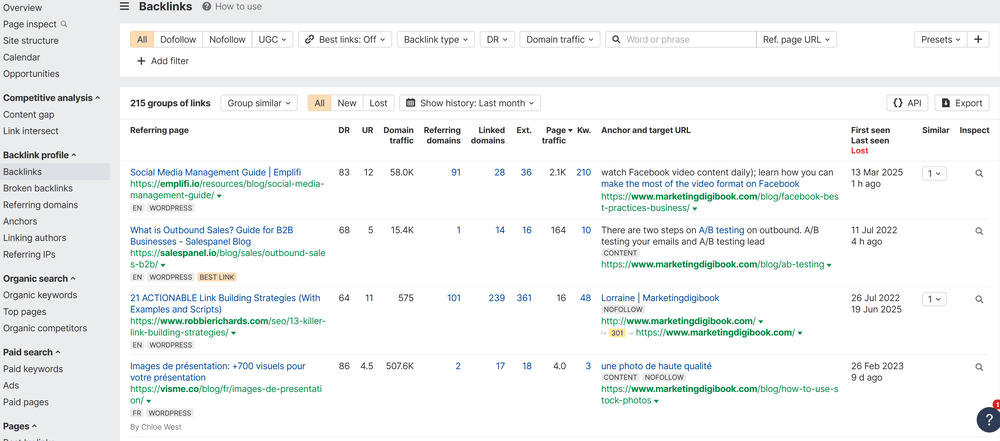
Use Ahrefs or Semrush to review which domains link to you. You’re looking for relevance, credibility, and natural patterns.
A local business with links from local organizations, partners, or respected publications has a strong “reputation profile.” A site with most links coming from unrelated, low-quality domains does not.
Step 2: Toxic link detection
If you find links from spammy domains — gambling, adult, or irrelevant foreign sites — you may need to add them to a disavow file in Search Console.
Disavowing is not something you do casually. But when toxicity is obvious and patterns are unnatural, you document and address it.
Step 3: Negative SEO check
Sometimes competitors or automated systems can harm a site by pointing large volumes of spammy links at it.
Watch for sudden spikes in referring domains. If your backlink graph suddenly jumps and the new domains are clearly spam, treat it as a warning sign.
Step 4: Build quality mentions
The best defense is building a strong baseline of high-quality mentions through PR, partnerships, guest content, or being cited as an expert in your niche.
7) Strategy & Growth Opportunities Audit — Turning the Diagnosis into a Treatment Plan
This is the part most people skip and it’s the part that turns an audit into growth.
An audit should not end with “here are 87 issues.” It should end with “here is the plan.”
Step 1: Low-hanging fruit
Open Search Console and look for keywords where you rank between positions 5 and 30. These are often the fastest wins.
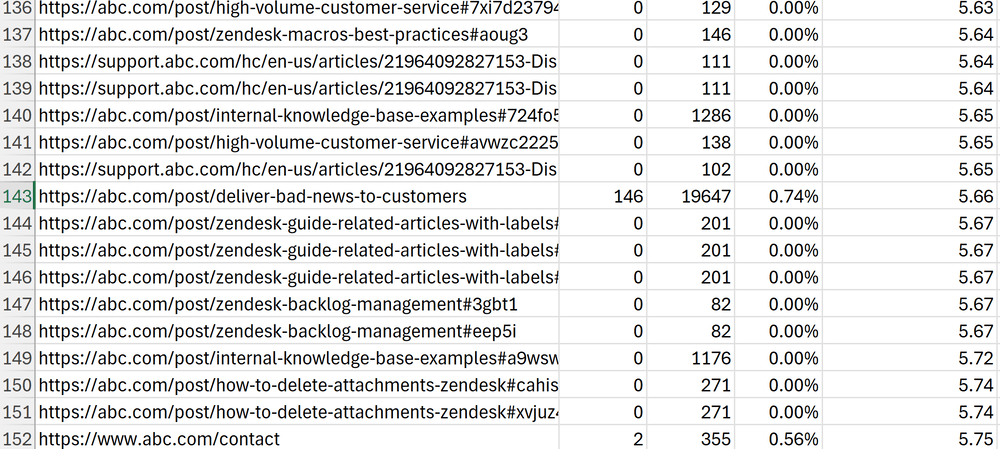
Why? Because Google already sees relevance. You don’t need to “convince” Google from zero, you need to strengthen signals enough to move into the top results.
Typical improvements that push these pages upward include better titles, improved internal linking, refreshed content, clearer structure, stronger topical coverage, and better media (screenshots, diagrams, examples).
Step 2: Cluster expansion
Once you know your key pages, build supporting articles that strengthen those pages.
The script example is straightforward: if you offer “Trademark Registration,” supporting topics could include “Trademark Search,” “Trademark Costs,” and “Common Mistakes.” This expands topical authority and captures more long-tail intent.
Step 3: Content refresh
Revisit older posts and improve them. Add new data, better images, examples from your business, and clearer explanations.
Google loves updated content, but not because it’s “new.” It loves content that stays accurate, complete, and aligned with modern intent.
Step 4: Competitor benchmarking
Use Ahrefs or Semrush to see which pages bring your competitors the most traffic.
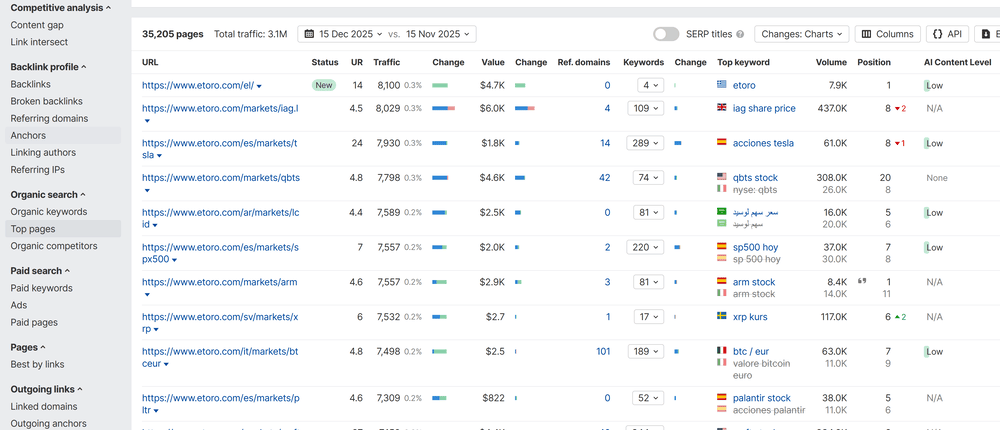
Then study structure: how they format, what subtopics they cover, how they answer questions, what they include (FAQs, screenshots, definitions, case examples).
You do not copy. You learn the framework and then build a better version using your own expertise and real differentiators.
Step 5: AI and entity visibility
Search your brand or product in tools like ChatGPT or Perplexity. If your site doesn’t appear in citations, treat it as a visibility gap.
This often signals that you need more authoritative content, more reputable mentions, and clearer entity relationships across your site.
This is your long-term treatment plan, not just fixing issues, but building the strength and authority to dominate your niche.
Putting It All Together: What a Complete SEO Audit Really Does
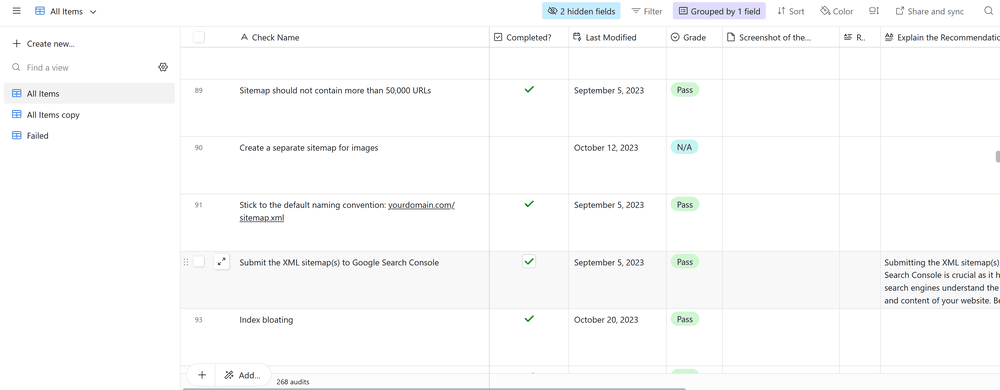
At this point, you’ve seen what a complete SEO audit checklist looks like, from:
- technical health and mobile readiness,
- to content depth and topical clustering,
- to international and local visibility signals,
- to EEAT trust building,
- to backlink quality and negative SEO protection,
- to growth strategy and competitive positioning.
And here’s the key point:
Diagnosis alone doesn’t bring results. Implementation does.
That’s why the best audits are not “reports.” They are decision-making tools. They tell you what matters, what’s urgent, what can wait, and what will drive the fastest compounding gains.
From Diagnosis to Expert Treatment: Making the Audit Actionable
By now, you’ve seen how many layers exist in a real SEO audit and how hidden issues can quietly block growth.
You’ve probably also realized that this isn’t just about adding keywords. It’s about understanding your entire website ecosystem.
And if you’re thinking: “This is exactly what I need, but I don’t have time to learn all of this or do it myself,” that’s where expert guidance can save months of trial and error.
A complete SEO audit should give you a personalized roadmap designed around business goals:
If you’re recovering from a traffic drop or a failed migration, you prioritize diagnosing indexation, technical regressions, and content decay first. If you’re trying to grow leads, you prioritize revenue pages, internal linking, topical clusters, and conversion alignment. If you’re expanding internationally, you prioritize hreflang, localization, and regional intent mapping.
It’s not just a technical report. It’s a clear, step-by-step plan that shows where your site stands today, what’s missing, and what to prioritize to see measurable growth.
Think of it as your website’s health check, one that turns confusion into clarity and clicks into clients.